XPARTCO
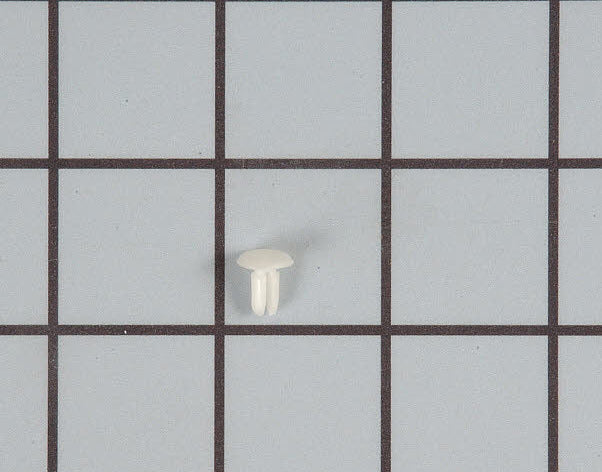
XPARTCO WB03X27704 Microwave Waveguide Locking Button
XPARTCO WB03X27704 Microwave Waveguide Locking Button
Couldn't load pickup availability
XPARTCO WB03X27704 Microwave Waveguide Locking Button – Compatible with GE Microwaves
Product Description
Protect your microwave’s internal components with the XPARTCO WB03X27704 Microwave Waveguide Locking Button. This high-quality aftermarket replacement secures the waveguide cover in place, preventing it from shifting, falling, or allowing food splatter to enter the waveguide channel. A broken or missing locking button can lead to sparking, uneven heating, or damage to the magnetron. Replacing it with this durable XPARTCO button restores safe and reliable microwave performance.
Replaces Part Numbers
WB03X27704, WB02X10997, PD00045753, EAP12582530, AP6783280, 4813990, PS12582530
Compatibility
This replacement waveguide locking button fits select GE countertop, over-the-range, and built-in microwaves.
Example compatible models include (but are not limited to):
GE JVM3160DFWW, JVM6175SK3SS, JVM7195SK5SS, PVM9005SJ2SS, and many others.
Always verify your microwave’s model number before ordering. Contact our support team if you’re unsure.
✅ Key Features
-
🔄 Aftermarket Replacement – Designed to match OEM fit, size, and retention strength
-
🔒 Secures Waveguide Cover – Prevents shifting, sparking, or magnetron contamination
-
💰 Cost-Effective Solution – Affordable alternative to OEM locking buttons
-
🛠️ Durable Construction – Precision-molded plastic resists heat and wear
-
🛡️ Fixes Common Issues – Solves loose or missing cover, arcing, or uneven microwave heating
📐 Product Specification
-
Part Number: WB03X27704
-
Component Type: Microwave Waveguide Cover Locking Button
-
Material: High-strength molded plastic
-
Color: Black (may vary slightly by batch)
-
Mounting: Snaps into microwave cavity to retain waveguide cover
-
Compliance: Built to OEM-equivalent quality standards (not OEM)
🛠️ Installation Notes
Tools Needed: None (in most models)
⚠️ Safety First: Always unplug the microwave before servicing.
Microwaves contain high-voltage components even when unplugged — avoid internal access unless qualified.
Steps:
-
Disconnect power to the microwave.
-
Open the microwave interior and remove the damaged or missing locking button.
-
Position the new XPARTCO WB03X27704 locking button in the designated cavity slot.
-
Press firmly until it snaps into place.
-
Ensure the waveguide cover is securely held.
-
Restore power and test microwave operation.
⏱️ Time Required: 1–2 minutes
📦 Shop With Confidence
-
🚚 Free Shipping on All Orders
-
⚙️ Trusted Appliance Parts Supplier
-
🔄 30-Day Return Policy
Protect your microwave and prevent sparking — Add to Cart Now for a fast, reliable fix!
Share